Deploying the best E-Resources for Software Engineering Students

We at IT Engg Portal, provide all the Computer and IT Engineering students of Pune University with well compiled, easy to learn notes and other E-resources based on the curriculum

Power Point Presentations and Video Lectures for Download

We provide the most recommended power point presentations and Video Lectures from the most prominent Universities for most of the difficult subjects to ease your learning process

Bundling Codes for your Lab Practicals

Deploying the best of available E-Resources for Tech Preparation (Campus Placements)

The Complete Placement Guide

Our Team has worked hard to compile this E-Book for all students heading for Campus Placements. The book is a complete solution for Technical Preparation for Campus Placements.

Pune University's most viewed website for Computer and IT Engineering

With more than 4,00,0000 pageviews from 114 countries over the globe, we are now the most viewed website for Ebooks and other E- Resources in Computer and IT Engineering

Showing posts with label is. Show all posts

Sunday, February 26, 2012

Transposition Ciphers : Information Security

     
A transposition cipher is a method of encryption by which the positions held by units of plaintext (which are commonly characters or groups of characters) are shifted according to a regular system, so that the ciphertext constitutes a permutation of the plaintext. That is, the order of the units is changed.    

    Transposition ciphers are rather simple to understand. As the name implies, a transposition cipher involves the transposing – or moving – of characters from one place to another. See the example below. You’ll notice that all the characters used in the original text are also present in the transposed text.


Original Text: HELLO WORLD
Transposed Text: HLOOLOLWRD
Side note: This is an example of a rail fence cipher. A rail fence cipher is computed as follows. Notice the words are spelled out in columns, starting at the top left:
HLOOL
ELWRD

Cracking the Code

Cracking a transposition cipher can be accomplished with a process called anagramming.  Using language statistics, its relatively easy to crack a transposition cipher. If you know the frequency in which certain letter combinations occur, it is possible to crack a transposition cipher (see Alan Konheim’s book for an in-depth review).  In this case, we can crack the cipher as such:

The letter pairs HL, HW, HR and HD have a frequency of less than 0.0010 in the English language, so we’ll discard those for now. HE has a frequency of 0.0305. However, other arrangements – “HO” for example – are also candidates which shouldn’t be ruled out. In the end, you should get something like:
HE
LL
OW
OR
LD
While this method is rather reliable, remember that you’re also relying on statistical pattern matching, which is always error prone to some degree.

By themselves, transposition ciphers provide very little confidentiality.  Modern algorithms still use transposition, however only as a piece of the algorithm – not the whole.

Other methods for Transposition Cipher:

One of the oldest ways to do this was created by the ancient Egyptians and Greeks. It uses a stick called scytale . They would have used wooden sticks and parchment, but we're going to use poster tubes and adding machine tape!

How the scytale cipher works


  1. Get a scytale and a strip of parchment.
  2. Wrap your parchment around your scytale until the stick is covered. Try to avoid overlapping and gaps.
  3. Write your message along the length of the stick, one character per pass of the paper. If you need more space, rotate the stick away from you and keep writing.
  4. Unwrap the scytale and send the scrambled message to a friend with the same-diameter stick.
  5. The friend then wraps his scytale with the encoded parchment. Since the diameters are the same, the message is clearly legible!
This technique was very useful in ancient battles; the Spartans are known to have used this rather extensively. Each general was given a stick of uniform diameter so that he could quickly encipher and decipher any message sent from other generals. Notice how quick and easy this is to use!

          However, it is also rather easy to crack. In a battle situation, the most likely way to crack this would be to steal a general's scytale. Then, each message could be read easily. However, it can be cracked even without stooping to theivery. As it ends up, the scytale is just a very old (and rather simple) version of a greater class of ciphers called matrix transposition ciphers. The way the simplest of these works is by picking a matrix of a fixed size (say, 6x10) and then writing your message across the rows. The encipherment step consists of writing down the letters in the matrix by following the columns. Here's a simple 6x10 example:


TROOPSHEAD
INGWESTNEE
DMORESUPPL
IESSENDGEN
ERALDUBOIS
MENTOAID


Where we've written the message:
troops heading west need more supplies. send general dubois' men to aid


row by row into the matrix. Then, to encipher this, we simply read off the columns to get:

TIDIE MRNME REOGO SANOW RSLTP EEEDO
SSSNU AHTUD BIENP GODAE PEIDE LNS


The scytale cipher is just like one of these. Note that the number of "rows" in your message is determined by the diameter of your stick and the size of your writing. Cracking them, as you may guess, is just a matter of systematic guess-and-check.

How to crack the simple matrix transposition ciphers:
  1. Count how many letters are in the ciphertext (for this example, assume the ciphertext is 99 letters long)
  2. Make all of the matrices that would fit such a length (e.g. 2x50, 3x33, 4x25, 5x20, 6x17, 7x15, 8x13, 9x11, 10x10). Use TWO of each size.
  3. For each size matrix, write out the ciphertext across the rows on one copy. On the other copy, write out the ciphertext down the columns.
  4. At each stage, see if you can find anything legible, reading perpendicular to how you put the ciphertext in.
A harder version of the matrix transposition cipher is the column-scrambled matrix transposition cipher. Just like the ones above, you find a matrix of suitable dimensions and write your text in row-by-row. If there are blank cells left, fill them in with a dummy character (sometimes an 'X'). However, before writing down the ciphertext from the columns, you first scramble the columns. This generates a new matrix of the same size. Now read off the text down the columns, as before. This is a harder cipher, but there is a systematic way to crack it.
How to crack the column-scrambled matrix transposition ciphers:
  1. Count how many letters are in your ciphertext (for example, 75) and factor that number (75 =5*5*3).

  2. Create all of the possible matrices to fit this ciphertext (in our case, 3x25, 5x15, 15x5, 25x3).

  3. Write the ciphertext into these matrices down the columns.

  4. For each of your matrices, consider all of the possible permutations of the columns (for n columns, there are n! possible rearrangements). In our case, we hope that the message was enciphered using one of the last two matrices (the 15x5 and the 25x3), since in those cases, we have only 6 and 120 possibilites to check (3! = 6, 5! = 120, 15! ~ 1.31x10^12, 25! ~ 1.55x10^25).

  5. Rearrange each matrix to see if you get anything intelligible. Read the message off row-by-row. Note that this is much more easily done by a computer than by hand, but it is doable (for small matrices).

Material referenced from Infosecschool and Cornell University

Monday, December 19, 2011

Encryption & Decryption : Information Security


Encryption is the conversion of data into a form, called a ciphertext, that cannot be easily understood by unauthorized people. Decryption is the process of converting encrypted data back into its original form, so it can be understood.
The use of encryption/decryption is as old as the art of communication. In wartime, a cipher, often incorrectly called a code, can be employed to keep the enemy from obtaining the contents of transmissions. Simple ciphers include the substitution of letters for numbers, the rotation of letters in the alphabet, and the "scrambling" of voice signals by inverting the sideband frequencies. More complex ciphers work according to sophisticated computer algorithms that rearrange the data bits in digital signals.
In order to easily recover the contents of an encrypted signal, the correct decryption key is required. The key is an algorithm that undoes the work of the encryption algorithm. Alternatively, a computer can be used in an attempt to break the cipher. The more complex the encryption algorithm, the more difficult it becomes to eavesdrop on the communications without access to the key.
Encryption/decryption is especially important in wireless communications. This is because wireless circuits are easier to tap than their hard-wired counterparts. Nevertheless, encryption/decryption is a good idea when carrying out any kind of sensitive transaction, such as a credit-card purchase online, or the discussion of a company secret between different departments in the organization. The stronger the cipher -- that is, the harder it is for unauthorized people to break it -- the better, in general. However, as the strength of encryption/decryption increases, so does the cost.
Encryption is mainly of two types :
  •  Asymmetric Key Encryption (Public-Key Encryption)
  •  Symmetric Key Encryption

Symmetric-Key Encryption


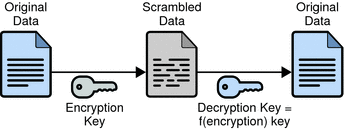
   With symmetric-key encryption, the encryption key can be calculated from the decryption key, and vice versa. With most symmetric algorithms, the same key is used for both encryption and decryption. 

The following figure shows a symmetric-key encryption.
Symmetric-Key Encryption

Figure shows symmetric-key encryption.

Implementations of symmetric-key encryption can be highly efficient, so that users do not experience any significant time delay as a result of the encryption and decryption. Symmetric-key encryption also provides a degree of authentication, since information encrypted with one symmetric key cannot be decrypted with any other symmetric key. Thus, as long as the symmetric key is kept secret by the two parties using it to encrypt communications, each party can be sure that it is communicating with the other as long as the decrypted messages continue to make sense.

   Symmetric-key encryption is effective only if the symmetric key is kept secret by the two parties involved. If anyone else discovers the key, it affects both confidentiality and authentication. A person with an unauthorized symmetric key not only can decrypt messages sent with that key, but can encrypt new messages and send them as if they came from one of the two parties who were originally using the key.

    Symmetric-key encryption plays an important role in the SSL protocol, which is widely used for authentication, tamper detection, and encryption over TCP/IP networks. SSL also uses techniques of public-key encryption, which is described in the next section.

 Asymmetric Key Encryption :


Public-Key Encryption

The most commonly used implementations of public-key encryption are based on algorithms patented by RSA Data Security. Therefore, this section describes the RSA approach to public-key encryption.

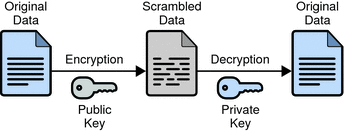
   Public-key encryption (also called asymmetric encryption) involves a pair of keys—a public key and a private key—associated with an entity that needs to authenticate its identity electronically or to sign or encrypt data. Each public key is published, and the corresponding private key is kept secret. 

The following figure shows a simplified view of the way public-key encryption works.
Public-Key Encryption


Figure shows public-key encryption


    Public—key encryption lets you distribute a public key, and only you can read data encrypted by this key. In general, to send encrypted data to someone, you encrypt the data with that person’s public key, and the person receiving the encrypted data decrypts it with the corresponding private key.

   Compared with symmetric-key encryption, public-key encryption requires more computation and is therefore not always appropriate for large amounts of data. However, it’s possible to use public-key encryption to send a symmetric key, which can then be used to encrypt additional data. This is the approach used by the SSL protocol.

     As it happens, the reverse of the scheme shown in Figure also works: data encrypted with your private key can be decrypted with your public key only. This would not be a desirable way to encrypt sensitive data, however, because it means that anyone with your public key, which is by definition published, could decrypt the data. Nevertheless, private-key encryption is useful, because it means you can use your private key to sign data with your digital signature—an important requirement for electronic commerce and other commercial applications of cryptography. Client software can then use your public key to confirm that the message was signed with your private key and that it hasn’t been tampered with since being signed. Digital Signatures on Digital Signatures and subsequent sections describe how this confirmation process works.


========================
Video Lectures


Symmetric Key Cryptography : part 1


Symmetric Key Cryptography : part 2


Symmetric Key Cryptography : Block Ciphers & DES


Block Ciphers, DES, Triple DES


Integrity & message Authentication


Symmetric & Asymmetric Encryption


Asymmetric Encryption

============================================


Saturday, December 17, 2011

Malicious Logic, Worms, Viruses & Trojans


        Malicious logic is defined as any instructions which may “cause a site’s security policy to be violated” . This typically includes applications which surreptitiously perform harmful actions on behalf of a subject. This paper focuses on Trojan Horses, various types of computer viruses, and worms. Also discussed are risk mitigation methodologies used to combat malicious logic.


Trojan Horses :


    In computers, a Trojan horse is a program in which malicious or harmful code is contained inside apparently harmless programming or data in such a way that it can get control and do its chosen form of damage, such as ruining the file allocation table on your hard disk. In one celebrated case, a Trojan horse was a program that was supposed to find and destroy computer viruses. A Trojan horse may be widely redistributed as part of a computer virus.
    The term comes from Greek mythology about the Trojan War, as told in the Aeneid by Virgil and mentioned in the Odyssey by Homer. According to legend, the Greeks presented the citizens of Troy with a large wooden horse in which they had secretly hidden their warriors. During the night, the warriors emerged from the wooden horse and overran the city.   Trojan horse is a generic name given to all Trojan programs and they can be further categorized by their primary payload functions and may generally includes the following types:
  • Backdoor.Trojan - a Trojan with a primary purpose of opening a back door to allow remote access at a later time.

  • Downloader - a Trojan with a primary goal of downloading another piece of software, usually additional malware.

  • Infostealer - a Trojan that attempts to steal information from the compromised computer.


Viruses


In computers, a virus is a program or programming code that replicates by being copied or initiating its copying to another program, computer boot sector or document. Viruses can be transmitted as attachments to an e-mail note or in a downloaded file, or be present on a diskette or CD. The immediate source of the e-mail note, downloaded file, or diskette you've received is usually unaware that it contains a virus. 
    Some viruses wreak their effect as soon as their code is executed; other viruses lie dormant until circumstances cause their code to be executed by the computer. Some viruses are benign or playful in intent and effect and some can be quite harmful, erasing data or causing your hard disk to require reformatting. A virus that replicates itself by resending itself as an e-mail attachment or as part of a network message is known as a worm.
     Generally, there are three main classes of viruses:
File infectors. Some file infector viruses attach themselves to program files, usually selected .COM or .EXE files. Some can infect any program for which execution is requested, including .SYS, .OVL, .PRG, and MNU files. When the program is loaded, the virus is loaded as well. Other file infector viruses arrive as wholly-contained programs or scripts sent as an attachment to an e-mail note.
System or boot-record infectors. These viruses infect executable code found in certain system areas on a disk. They attach to the DOS boot sector on diskettes or the Master Boot Record on hard disks. 
Macro viruses. These are among the most common viruses, and they tend to do the least damage. Macro viruses infect your Microsoft Word application and typically insert unwanted words or phrases.
The best protection against a virus is to know the origin of each program or file you load into your computer or open from your e-mail program. Since this is difficult, you can buyanti-virus software that can screen e-mail attachments and also check all of your files periodically and remove any viruses that are found. From time to time, you may get an e-mail message warning of a new virus. Unless the warning is from a source you recognize, chances are good that the warning is a virus hoax.
The computer virus, of course, gets its name from the biological virus. The word itself comes from a Latin word meaning slimy liquid or poison.
Worms


  In a computer, a worm is a self-replicating virus that does not alter files but resides in active memory and duplicates itself. Worms use parts of an operating system that are automatic and usually invisible to the user. It is common for worms to be noticed only when the uncontrolled replication consumes system resources, slowing or halting other tasks.
      
   A worm is another kind of computer virus. The distinction between viruses and worms is that a worm has the ability to copy itself to other systems . Viruses can be designed to detect vulnerabilities in other systems and use those vulnerabilities as attack vectors in which to spread to other systems. Another method of spreading is the use of the subject’s email client (Bishop). By surreptitiously sending an infected file to contacts from the client’s address book, worms can propagate themselves exponentially using the initial subject’s contacts as a starting point.