


There are many Operators and Functions available in SQL which can be used to make our programming task more easier and conventional. Let us explore a few important functions and operators which can be used for most common cases.
So,
What is an Operator?
=> An operator is a symbol or keyword indicating an operation that acts on one or more elements.
What is a Function?
=> A function is a built-in, named routine that performs a specialized task. Most functions take parenthesized arguments, which are values you pass to the function that the function then uses to perform its task. Arguments can be column names, literals, nested functions, or more-complex expressions.
Let us now have a glance on the most commonly used Operators and Functions.
(The most traditional operators like +,-,*,/ are ignored here)
- Creating Derived Columns
You can use operators and functions to create derived columns. A derived column is the result of a calculation and is created with a SELECT-clause expression that is something other than a simple reference to a column. Derived columns don’t become permanent columns in a table; they’re for display and reporting purposes.
The values in a derived column often are computed from values in existing columns, but you also can create a derived column by using a constant expression (such as a string, number, or date) or system value (such as
the system time).
Consider the following 3 examples for better understanding.
Query : A constant expression in a SELECT clause. No FROM clause is needed, because I’m not retrieving data from a table.
See the below figure for the result.

Your DBMS will assign the derived column a default name, typically the expression itself as a quoted identifier. You should name derived columns explicitly with an AS clause because system-assigned names can be long, unwieldy, and inconvenient for database applications to refer.
Now, have a look a better example , Here, I’ve retrieved a column and a constant expression. See the below fig for the result

Finally, have a look at this example for getting a clear picture about derived columns
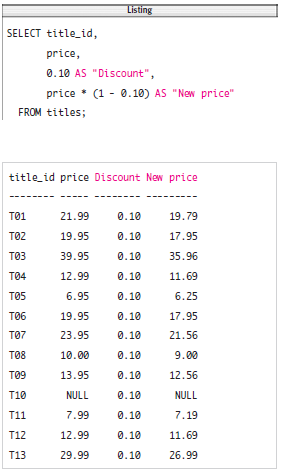
Query : List the book prices discounted by 10 percent. The derived columns would have DBMS specific default names if the AS clauses were removed. See the below fig for the result.
- Concatenating Strings with || Operator
Use the operator || to combine, or concatenate, strings.
The operator’s important characteristics are:
◆ The operator || is two consecutive vertical-bar, or pipe, characters.
◆ Concatenation doesn’t add a space between strings.
◆ ||, a dyadic operator, combines two strings into a single string: ‘formal’ || ‘dehyde’ is
‘formaldehyde’.
◆ You can chain concatenations to combine multiple strings into a single string: ‘a’ || ‘b’ || ‘c’
|| ‘d’ is ‘abcd’.
◆ Concatenation with an empty string (‘’) leaves a string unchanged: ‘a’ || ‘’ || ‘b’ is ‘ab’.
◆ The result of any concatenation operation that involves a null is null: ‘a’ || NULL || ‘b’ is
NULL.
How do we use it?
To concatenate strings:
◆ Type: string1 || string2
Explanation :
String1 and string2 are the strings to be combined. Each operand is a string expression such as a column that contains character strings, a string literal, or the result of an operation or function that returns a string
Let's have a look at a few example for better understanding
Query : List the authors’ first and last names, concatenated into a single column and sorted by last name/ first name.

Example 2 :
List biography sales by descending sales order. Here, I need to convert sales from an integer to
a string.

Example 3 :
List biographies by descending publication date. Here, I need to convert pubdate from a datetime to a string.

- Extracting a Substring with SUBSTRING()
Use the function SUBSTRING() to extract part of a string. The function’s important characteristics are:
◆ A substring is any sequence of contiguous characters from the source string, including an empty string or the entire source string itself.
◆ SUBSTRING() extracts part of a string starting at a specified position and continuing for a specified number of characters.
◆ A substring of an empty string is an empty string.
◆ If any argument is null, SUBSTRING() returns null. (But see the Oracle exception in the DBMS Tip in this section.)
How do we use SUBSTRING() function
◆ Type:
SUBSTRING(string FROM start [FOR length])
Explanation : string is the source string from which to extract the substring. string is a string expression such as a column that contains character strings, a string literal, or the result of an operation or function that
returns a string. start is an integer that specifies where the substring begins, and length is an integer that specifies the length of the substring (the number of characters to return). start starts counting at 1. If FOR length is omitted, SUBSTRING() returns all the characters from start to the end of string
Example : List the first initial and last name of the authors from New York State and Colorado.

- Changing String Case with UPPER() and LOWER()
Use the function UPPER() to return a string with lowercase letters converted to uppercase, and use the function LOWER() to return a string with uppercase letters converted to lowercase. The functions’ important characteristics are:
◆ A cased character is a letter that can be lowercase (a) or uppercase (A).
◆ Case changes affect only letters. Digits, punctuation, and whitespace are left unchanged.
◆ Case changes have no effect on empty strings (‘’).
◆ If its argument is null, UPPER() and LOWER() return null.
How do we use it?
To convert a string to uppercase or lowercase:
◆ To convert a string to uppercase, type: UPPER(string)
or
◆To convert a string to lowercase, type: LOWER(string)
Explanation :
String is a string expression such as a column that contains character strings, a string literal, or the result of an operation or function that returns a string
Example : List the authors’ first names in lowercase and last names in uppercase

- Trimming Characters with TRIM()
Use the function TRIM() to remove unwanted characters from the ends of a string. The function’s important characteristics are:
◆ You can trim leading characters, trailing characters, or both.
(You can’t use TRIM() to remove characters from within a string.)
◆ By default, TRIM() trims spaces, but you can strip off any unwanted characters, such as leading and
trailing zeros or asterisks.
◆ TRIM() typically is used to format results and make comparisons in a WHERE clause.
◆ TRIM() is useful for trimming trailing spaces from CHAR values.
◆ Trimming has no effect on empty strings (‘’).
◆ If any argument is null, TRIM() returns null.
How do we use it?
To trim spaces from a string:
◆ Type:
TRIM([[LEADING | TRAILING | BOTH] FROM] string)
Explanation :
String is a string expression such as a column that contains character strings, a string literal, or the result of an operation or function that returns a string. Specify LEADING to remove leading spaces, TRAILING to remove trailing spaces, or BOTH to remove leading and trailing spaces. If this specifier is omitted, BOTH is assumed.
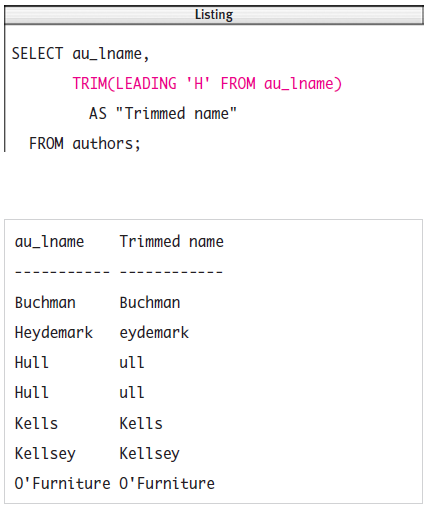
Example : Strip the leading H from the authors’ last names that begin with H.
- Finding the Length of a String with CHARACTER_LENGTH()
Use the function CHARACTER_LENGTH() to return the number of characters in a string.
The function’s important characteristics are:
◆ CHARACTER_LENGTH() returns an integer greater than or equal to zero.
◆ CHARACTER_LENGTH() counts characters, not bytes
◆ The length of an empty string (‘’) is zero.
◆ If its argument is null, CHARACTER_LENGTH() returns null.
How do we use it?
To find the length of a string:
◆ Type: CHARACTER_LENGTH(string)
Explanation :
String is a string expression such as a column that contains character strings, a string literal, or the result of an operation or function that returns a string.
Example : List the lengths of the authors’ first names.

-x-x-x-x-x-x-x-x-x-x-x-x-x-x-x-x-x-x-x-x-x-x-x-x-x-x-x-x-


